
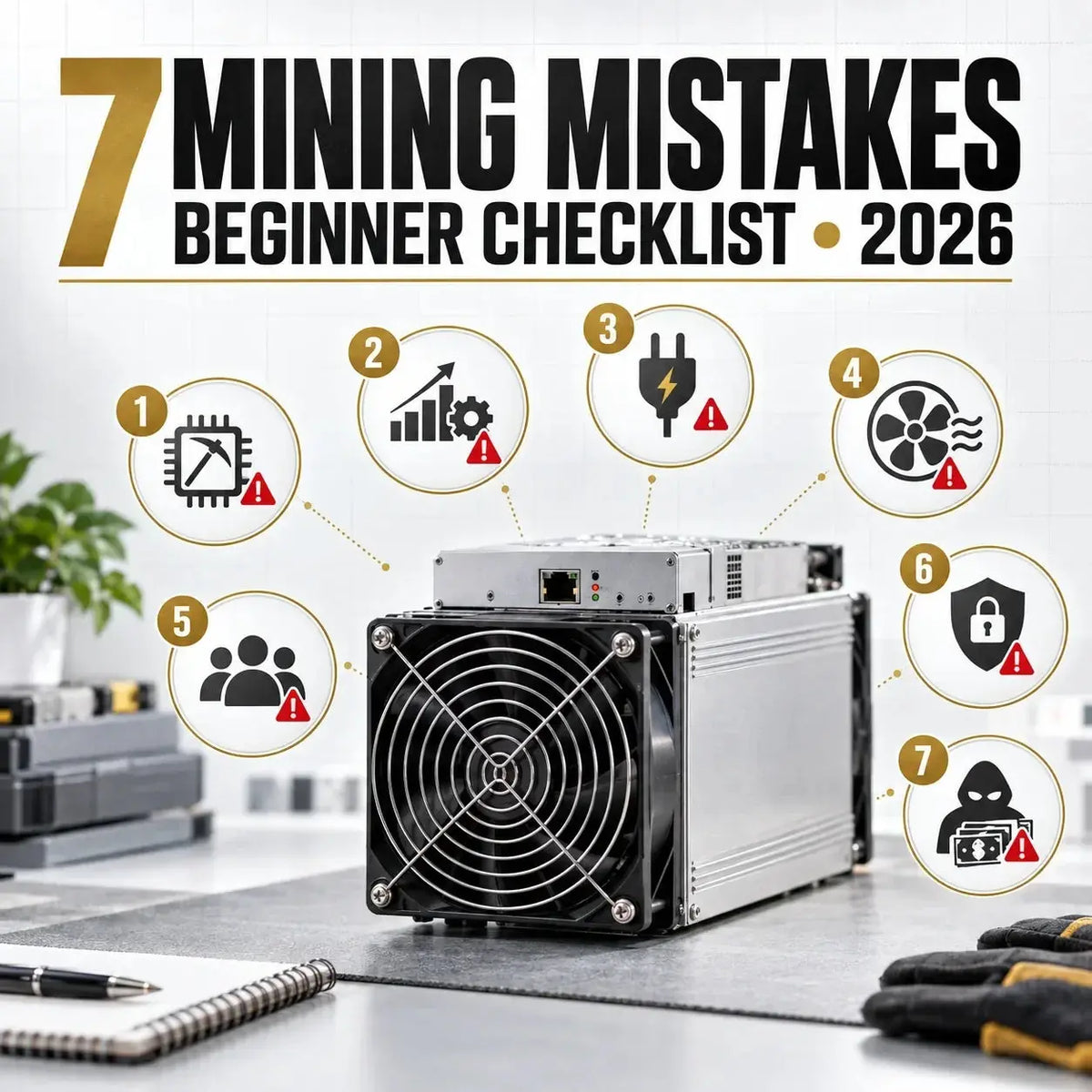
7 Crypto Mining Mistakes
Beginners Should Avoid
Algorithm fit · hardware efficiency · electricity and airflow · pool terms · security · profitability · scam checks
On This Page
1Quick Answer
The most expensive beginner mining mistakes usually happen before the miner earns its first accepted share. Buyers choose hardware that cannot mine the intended algorithm, compare hashrate without efficiency, underestimate wall power and exhaust heat, select a pool without reading payout rules, leave dashboards or wallets exposed, rely on a one-time profitability screenshot, or trust a seller promising guaranteed returns.
The original seven-error framework remains useful, but the practical lesson is broader: a miner is a complete operating system made of hardware, power, ventilation, network access, firmware, a mining endpoint, a payout wallet, and ongoing measurement. Every part needs to be verified together.
Do not order hardware until you can answer four questions: What exact algorithm does it mine? What is its measured wall power? Where will the heat and noise go? Which verified pool or solo endpoint will receive its work?
This guide focuses on preventable errors. For a full explanation of Proof of Work, start with what cryptocurrency mining is; for a complete first installation, use the beginner ASIC mining guide.
2Mistake 1: Buying Before Verifying the Algorithm
A mining device is not a general-purpose money machine. Most ASICs are designed around a specific Proof-of-Work algorithm and cannot be converted to an unrelated algorithm with a firmware setting. A Bitcoin SHA-256 miner cannot become a Litecoin Scrypt miner, and a Sia Blake2b-Sia miner cannot become a Kaspa kHeavyHash miner.
| Network Example | Mining Algorithm | Beginner Check |
|---|---|---|
| Bitcoin | SHA-256d | Confirm SHA-256 support, pool endpoint, voltage, PSU and firmware region |
| Litecoin / Dogecoin | Scrypt | Confirm whether the selected pool supports merged mining and how rewards are credited |
| Kaspa | kHeavyHash | Confirm the exact model generation and current pool compatibility |
| Sia | Blake2b-Sia | Do not assume every device marketed as BLAKE2b supports every BLAKE2b network |
| Zcash | Equihash with network-specific parameters | Verify the exact coin, parameter set, firmware and pool rather than relying on a broad algorithm label |
What to verify before ordering
- Coin and algorithm: use the network's current documentation, not only a marketplace title.
- Model and mode: similar model names may have different hashrates, voltage requirements or algorithms.
- Pool support: confirm an active pool or your planned solo infrastructure accepts that device and firmware.
- Wallet support: verify the payout asset, address format, minimum payout and custody plan.
- Network health: examine difficulty, hashrate, liquidity and active development instead of choosing a coin only because its price previously rose.
Sharing a broad hash-family name does not prove plug-and-play compatibility. Pool protocol, work format, network parameters, firmware and block-header rules can still differ.
3Mistake 2: Comparing Hardware by Hashrate Alone
Hashrate is meaningful only after the algorithm is fixed. Even then, more hashrate does not automatically mean better efficiency or a better installation. Compare effective hashrate, measured wall power, efficiency, purchase condition, noise, cooling demand, PSU requirements and total delivered cost.
Efficiency = wall power in watts / hashrate in the matching unit
For SHA-256 hardware this is commonly expressed as joules per terahash. Lower is generally more efficient when measurements use the same operating mode and boundary.
Also separate nominal specifications from observed operation. Ambient temperature, input voltage, firmware mode, dust, fan condition and rejected shares can change the result. The ASIC miner guide explains the hardware components and buying risks in more detail.
4Mistake 3: Underplanning Power, Heat and Noise
Every watt used by a miner eventually becomes heat in the room. A unit that consumes 3,500W is also a continuous 3,500W heat source before extra ventilation or air-conditioning load is counted. The correct plan begins with the electrical circuit and an exhaust route, not with a profit estimate.
| Measured Load | Daily Energy | Daily Cost at $0.10/kWh | Daily Cost at $0.20/kWh |
|---|---|---|---|
| 800W | 19.2 kWh | $1.92 | $3.84 |
| 2,200W | 52.8 kWh | $5.28 | $10.56 |
| 3,500W | 84.0 kWh | $8.40 | $16.80 |
kWh per day = wall watts / 1,000 x 24
Daily electricity cost equals kWh per day multiplied by your all-in utility rate. Add cooling, ventilation, pool fees and downtime separately.
- Electrical: match voltage, plug, PSU and circuit capacity; use a qualified electrician when the installation is uncertain.
- Airflow: keep intake and exhaust separated so hot air does not recirculate through the miner.
- Temperature: follow the manufacturer's operating range and monitor board or chip temperatures under sustained load.
- Dust: inspect filters and heatsinks without choking intake airflow.
- Noise: evaluate the actual installation mode; an industrial ASIC is rarely suitable for an occupied room without acoustic planning.
Use the full mining electricity cost guide for cost modeling and the home mining guide for room, network and ventilation planning.
5Mistake 4: Choosing a Pool by Fee or Size Alone
In pool mining, the pool assigns work and accounts for lower-difficulty shares that demonstrate contributed hashrate. The pool name or headline fee does not tell you whether your exact miner, region and payout expectations are a good fit.
| Check | Why It Matters | Warning Sign |
|---|---|---|
| Official endpoint | Prevents pointing hashrate at an impersonator or obsolete server | Endpoint arrives only through a private message or shortened link |
| Payout method | PPS, FPPS, PPLNS and solo-style models distribute variance differently | Method is not defined or examples replace written terms |
| Total fee and threshold | Pool fees, withdrawal rules and minimum payout affect cash flow | Hidden withdrawal charge or unexplained balance lock |
| Server region | Stable latency can reduce stale or rejected work | No regional endpoint or no status page |
| Worker reporting | Effective hashrate, accepted shares and rejects reveal setup problems | Only a revenue number is shown |
| Security and support | Verified domains, MFA and clear support channels reduce account risk | Support asks for seed phrases, remote wallet access or private keys |
Save a second verified pool endpoint as a fallback where the firmware supports it. After connecting, compare miner-side hashrate with the pool's rolling average and investigate persistent rejects rather than assuming the pool dashboard is wrong. The dedicated solo mining versus mining pools guide explains payout variance and control tradeoffs.
6Mistake 5: Leaving the Miner, Firmware or Wallet Exposed
A miner is a networked computer with firmware, credentials and the ability to redirect valuable hashrate. Treat its web interface like infrastructure, not a disposable appliance.
- Change default credentials. Use a unique password and store it in a password manager.
- Keep the dashboard private. Do not expose the miner's management port directly to the public internet.
- Segment where practical. Place mining devices on a separate local network or VLAN from personal computers and sensitive systems.
- Use trusted firmware. Download only from the manufacturer or a provider you intentionally selected; verify signatures or hashes when published.
- Record the known-good configuration. Save firmware version, pool addresses, worker names, network settings and measured performance before changing anything.
- Protect payout accounts. Enable MFA on pools, email and exchanges; never enter a seed phrase into a mining dashboard.
- Back up wallet recovery information offline. Test that the payout address belongs to the intended wallet before relying on it.
A download promising impossible efficiency, hidden overclocking or instant profit can redirect hashrate, steal credentials or destabilize the miner. Do not install firmware from an unverified chat attachment or mirrored file link.
Use the ASIC firmware security checklist before flashing or exposing remote access. CISA's general guidance also supports unique passwords, MFA, phishing awareness and timely software updates.
7Mistake 6: Treating a Profitability Screenshot as a Forecast
Mining profitability changes with coin price, network difficulty or hashrate, block rewards, transaction fees, pool terms, uptime, power cost and the miner's actual efficiency. A screenshot captures assumptions at one moment; it is not a contract.
Daily net = mined coin value - electricity - pool/service fees - cooling and maintenance allowance
Use measured wall power and pool-side effective hashrate. Recalculate with multiple price, difficulty and electricity scenarios.
Break-even days = total landed cost / average positive daily net
If daily net is zero or negative, the simple payback calculation has no meaningful finite result. It also does not capture hardware failure, resale value or tax treatment.
| Metric to Record | Source | Why It Matters |
|---|---|---|
| Effective hashrate | 24-hour or longer pool average | Shows delivered work, not a brief local peak |
| Wall power | Appropriate power meter or monitored circuit | Determines real electricity and heat load |
| Accepted / rejected shares | Pool worker dashboard | Reveals network, configuration or stability issues |
| Temperature and fan speed | Miner dashboard plus room measurement | Helps detect recirculation, dust or cooling failure |
| Uptime and disconnects | Miner, router or monitoring system | Downtime directly reduces submitted work |
| Actual payout | Pool ledger and wallet | Confirms fees, threshold and address configuration |
Use the crypto mining profitability guide for a fuller model, and keep purchase price separate from operating profit so sunk cost does not disguise a loss-making configuration.
8Mistake 7: Trusting Guaranteed Returns or Unverified Mining Offers
Real Proof-of-Work mining has variable revenue and unavoidable operating costs. A seller cannot guarantee a fixed daily return from public network mining while ignoring difficulty, price, downtime and power. FTC guidance identifies promises of fast, easy or guaranteed cryptocurrency profits as classic scam signals.
- Verify the legal business identity, domain history, physical contact details and independent complaints.
- Ask for the exact miner model, serial evidence, condition, algorithm, wall power, included PSU and warranty terms.
- For hosted or cloud mining, demand machine ownership terms, location, electricity rate, maintenance fee, downtime policy, payout evidence and withdrawal rules.
- Do not confuse Proof-of-Work mining pools with DeFi "liquidity mining" offers that ask you to connect a wallet or approve token spending.
- Never install remote-control software, firmware or wallet applications from an unsolicited message.
If the offer cannot explain where the machine is, what it mines, how power is billed, how rewards are calculated and how you withdraw without extra surprise fees, do not proceed.
9Beginner Preflight Checklist
- Coin, network and algorithm are confirmed from current sources.
- Exact model, condition, hashrate, wall power and efficiency are recorded.
- Voltage, plug, PSU, circuit and any electrician work are planned.
- Intake, exhaust, ambient temperature, dust and noise are addressed.
- Total landed cost includes shipping, tax, customs and installation.
- Profitability is tested at more than one price, difficulty and power scenario.
- Pool domain, endpoint, payout model, fee and threshold are verified.
- Payout address is checked and a small initial payout can be confirmed.
- Default password is changed and management access remains private.
- Firmware source, version and rollback or recovery steps are documented.
- Temperatures, accepted shares, rejects and effective hashrate will be monitored.
- No return is treated as guaranteed and no seed phrase is shared.
For software selection, pool configuration and update risks, continue with the Bitcoin mining software guide.
10First Checks When Mining Does Not Look Right
| Symptom | Likely Areas | First Safe Checks |
|---|---|---|
| Miner online, zero hashrate | Firmware mode, hashboards, PSU, startup delay | Review dashboard alarms, input voltage, connectors and manufacturer logs before rebooting repeatedly |
| Local hashrate but pool offline | Endpoint, DNS, gateway, firewall, worker format | Re-enter the official pool URL, verify network time and test a known fallback endpoint |
| High rejected or stale shares | Latency, unstable tuning, wrong protocol or clock | Return to stock settings, compare regions and confirm firmware-pool compatibility |
| Temperature keeps rising | Recirculation, blocked intake, dust, failed fan, high ambient heat | Reduce load safely, clear airflow and inspect fans before sustained operation |
| Frequent restarts | Power quality, PSU, overclock, heat or failing board | Use stock settings, check wall power and logs, then isolate hardware methodically |
| Payout missing | Threshold, schedule, wallet address, account security | Check the pool ledger and written payout terms; never pay a "release" fee to support |
Change one variable at a time and keep a record. Randomly changing firmware, pools, tuning and network settings together makes the original cause harder to identify.
11FAQ: Beginner Crypto Mining Mistakes
What is the biggest mistake a new miner makes?
Buying before confirming algorithm compatibility, electrical requirements and a realistic operating-cost model. Those three checks determine whether the device can mine the intended network and run safely at the location.
Does higher hashrate always mean a better miner?
No. Compare hashrate only within the same algorithm, then compare wall power, efficiency, stability, condition, noise, cooling demand and total landed cost.
Can I start mining Bitcoin with a laptop or gaming PC?
You can learn about software and Proof of Work, but competitive Bitcoin SHA-256 mining uses ASIC hardware. Installing unknown mining software also creates malware and cryptojacking risks.
Should a beginner choose the largest mining pool?
Not automatically. Verify the pool's official endpoint, fees, payout model, threshold, regional server, reporting, security and support. Larger size alone does not answer those questions.
What temperature should an ASIC miner run at?
There is no universal number for every model. Follow the manufacturer's ambient and component limits, monitor sustained temperatures, and investigate trends rather than copying a limit from another device.
Can a profitability calculator guarantee ROI?
No. It models assumptions. Recalculate with measured power and hashrate, current network data, multiple electricity and price scenarios, fees, downtime, maintenance and hardware cost.
Is used mining hardware always a bad choice?
No, but condition changes the decision. Ask for serial and operation evidence, inspect fans and boards, verify stock performance, understand warranty limits, and price possible repair or downtime.
Is cloud mining safer because I do not operate hardware?
It removes local heat and power work but adds counterparty and contract risk. Verify machine ownership, location, fees, payout evidence, withdrawal rules and company identity. Guaranteed returns remain a red flag.
12References and Further Reading
- Bitcoin Developer Guide: MiningTechnical explanation of solo mining, pooled mining, shares, block templates and target thresholds.
- Stratum V2 Specification: Protocol SecuritySpecification covering authenticated encrypted mining communication and pool authority keys.
- CISA: Secure Our WorldOfficial guidance on strong passwords, password managers, MFA, phishing awareness and software updates.
- FTC: What To Know About Cryptocurrency and ScamsConsumer guidance on guaranteed-profit claims, fake cryptocurrency platforms and wallet risks.
- U.S. Department of Energy: Energy Saver GuideOfficial consumer reference for estimating appliance electricity use and operating cost.
Final Verdict
Successful mining begins with verification, not optimism. Match the algorithm, compare efficiency with measured wall power, plan the circuit and exhaust, read pool terms, secure the miner and wallet, and recalculate profitability from real operating data.
The safest beginner setup is the one you can explain line by line. If a seller, pool, firmware provider or hosting contract hides how the system works, pause before sending money or hashrate.




Leave a comment
This site is protected by hCaptcha and the hCaptcha Privacy Policy and Terms of Service apply.