
Best Bitcoin Mining Software in 2026:
Setup and Security Guide
ASIC firmware · fleet management · pool configuration · monitoring and secure remote access
On This Page
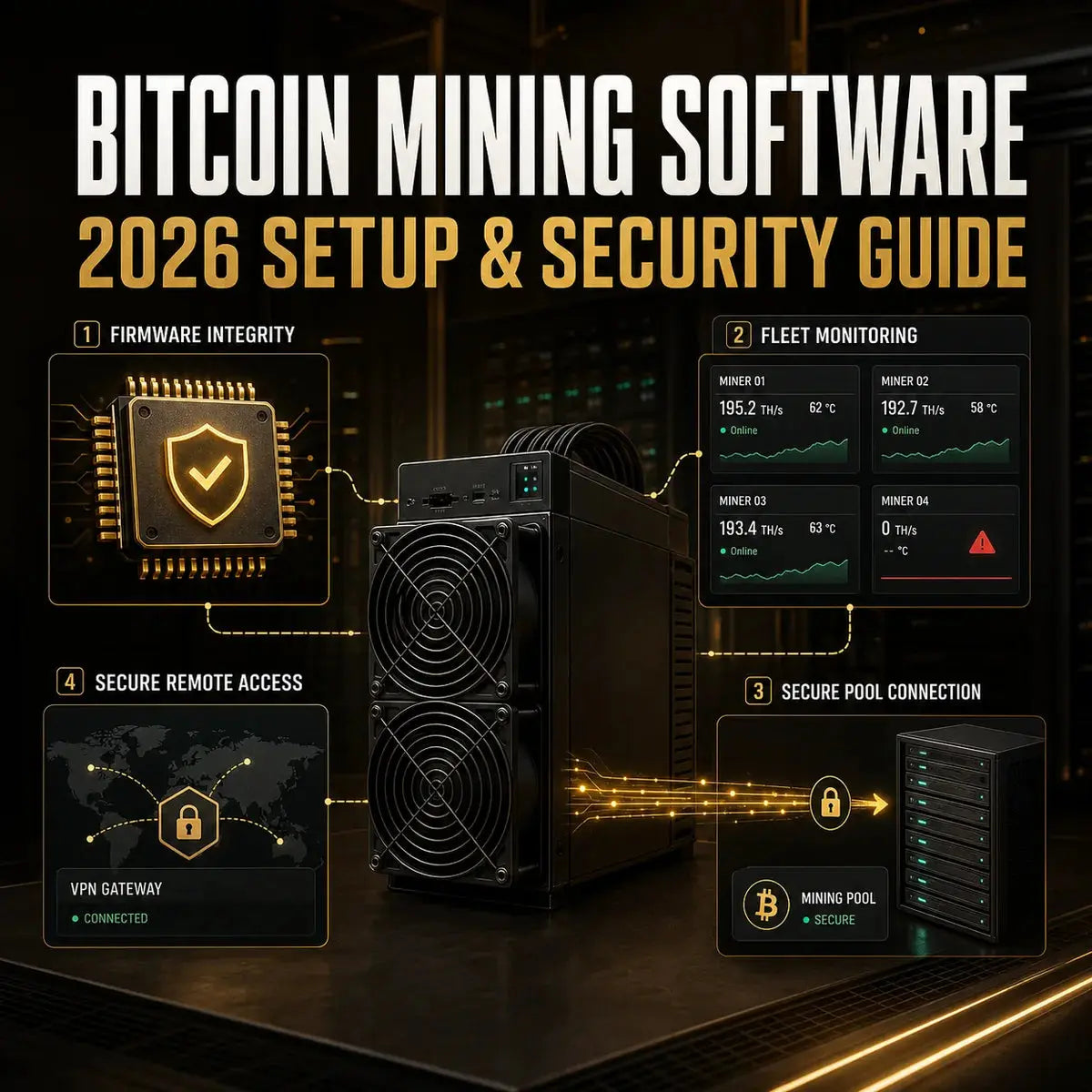
Bitcoin mining software still matters in 2026, but the term covers several tools. A modern ASIC contains firmware that runs the hardware. A pool delivers work through a mining protocol, while a fleet platform collects telemetry and may perform bulk actions. Desktop programs such as CGMiner, BFGMiner, or NiceHash tools are not universal replacements for current ASIC firmware.
This update keeps the original beginner path, configuration, monitoring, pitfalls, and Stratum V2 discussion while answering: which software layer do you need, and how can you deploy it safely? For hardware, power, pool, and economic planning, use the complete Bitcoin mining guide.
1What Does Bitcoin Mining Software Mean in 2026?
There is no single application that performs every mining task. The software stack usually has four layers:
Software cannot turn unsupported hardware into a competitive SHA-256 miner. Bitcoin's network is dominated by specialized ASICs. A desktop GPU program may mine another algorithm and receive payment in bitcoin, but that is different from directly mining Bitcoin blocks with the GPU.
2The Main Software Categories for Beginners
Stock ASIC Firmware
For a first setup, the manufacturer's current firmware is normally the safest baseline. It is built for a defined model and control board and provides pool configuration, status data, logs, and supported power modes. Download it only from the official support domain and match the exact model.
Compatible Third-Party Firmware
Third-party firmware can add tuning, fleet integration, or power management. Braiins OS, for example, publishes a supported-device list and verification data for release assets. Check the model revision, control board, restrictions, warranty terms, and recovery method before installation.
Fleet Management and Monitoring Platforms
For multiple miners, platforms such as Foreman or Braiins Manager can centralize hashrate, temperature, fan, uptime, pool, and alert data on supported equipment. Automation should be bounded: alert first, then allow a tested action such as one restart or pool correction instead of an endless reboot loop.
CGMiner, BFGMiner, and Similar Clients
CGMiner and BFGMiner remain relevant to certain USB ASIC, FPGA, proxy, development, and legacy workflows. However, a recent Antminer or WhatsMiner usually runs embedded firmware. Check the repository, driver, operating system, and device documentation instead of assuming a desktop client can replace it.
Where NiceHash Fits
NiceHash is a hashrate marketplace with separate software and connection options. QuickMiner and NiceHash OS mainly serve CPU/GPU workflows, while compatible ASICs use an appropriate stratum endpoint or supported firmware path. Payment in BTC does not necessarily mean the device directly mines Bitcoin.
3Bitcoin Mining Software Comparison
| Category | Primary role | Best fit | Main check before use |
|---|---|---|---|
| Stock firmware | Run and configure one ASIC | Beginners and warranty-sensitive operators | Exact model, control board, and official download source |
| Third-party firmware | Tuning, power modes, and integrations | Operators with tested compatibility and recovery plans | Supported-device list, checksum or signature, fees, warranty, rollback |
| Fleet manager | Monitoring, alerts, groups, and bulk actions | Multiple miners or multiple locations | Device support, local agent security, permissions, data path |
| Pool or proxy layer | Route jobs and accepted shares | Every pool-mining setup | Pool domain, region, protocol, worker syntax, failover endpoint |
| Desktop client | Legacy, USB, GPU, development, or marketplace use | Only hardware explicitly supported by the software | Repository authenticity, device driver, OS, and algorithm support |
Start with current stock firmware, one reputable pool, and simple local monitoring. Add third-party firmware or a cloud fleet platform only when a specific operational need justifies the extra access and update risk.
4How to Choose the Right Software Stack
The original three-step selection framework still works when the questions are made ASIC-specific.
- Start with hardware: record the exact miner model, control-board type, firmware version, network interface, and whether the vendor permits third-party firmware.
- Match your technical comfort: one home miner may need only its local dashboard. A farm may need discovery agents, role-based access, alert routing, and bulk controls.
- Define the operating goal: choose software for stability, energy control, reporting, curtailment, or remote maintenance. Do not install a tool merely because it advertises higher hashrate.
Also evaluate documentation, recovery, data retention, permissions, and metric exports. A free tool without a reliable rollback path can become expensive after one failed fleet-wide update.
5A Safe Firmware Installation and Update Workflow
A wrong image, interrupted update, incompatible control board, or malicious download can take a miner offline or redirect work. Use a controlled process:
- Open the vendor or developer's official support page from a trusted bookmark.
- Confirm model, hardware revision, control board, and prerequisite version.
- Read release notes, known issues, and recovery instructions.
- Verify a published checksum or digital signature when the provider supplies one.
- Export working pool and network settings and record the current version.
- Update one non-critical miner first and keep it at conservative settings.
- Observe shares, temperature, power, and restarts before expanding the rollout.
- Keep the approved image and rollback instructions in a controlled archive.
Use stable power and network access during the firmware process. Never close the page, reboot the miner, or cut power merely because progress appears slow. Follow the exact vendor procedure and recovery guidance.
For a deeper download and access audit, use the ASIC miner firmware and software security guide.
6Core Settings That Matter Most
Pool URL, Worker, and Failover
Copy the regional endpoint from the pool's official page, use a unique worker name, and configure backup pools where the firmware supports them. A failover entry should be a real, tested endpoint, not a duplicate typo. Compare pool terms and payout methods in the Bitcoin mining pool comparison.
Power Mode, Tuning, and Fan Policy
Begin at stock settings. Record baseline hashrate, accepted shares, wall power, temperature, and error counts before changing voltage, frequency, or power targets. Apply one change at a time. A locally higher dashboard hashrate is not useful if rejected shares, hardware errors, heat, or restarts increase.
Network and Time
Use reliable DNS and network infrastructure, reserve or document miner addresses, and keep time synchronization working. Consistent naming by site, rack, and unit makes logs and alerts actionable. Avoid exposing a miner dashboard directly to the internet through port forwarding.
7Monitoring, Alerts, and Controlled Automation
Track more than local hashrate: pool-side hashrate, accepted and rejected shares, temperatures, fan speed, power, hardware errors, pool status, uptime, reboot count, and last telemetry update.
| Signal | Why it matters | First response |
|---|---|---|
| No accepted shares | The miner may be hashing locally without credited work | Check pool URL, worker syntax, DNS, clock, and logs |
| Hashrate drop | Can indicate throttling, a missing board, tuning instability, or pool trouble | Compare local and pool data before restarting |
| Temperature rise | May reduce stability and component life | Inspect airflow, inlet temperature, dust, fan status, and power mode |
| Repeated reboots | Automation may be hiding a power, firmware, or thermal fault | Stop the loop, collect logs, and return to baseline |
| Pool changed | Unexpected changes may indicate error or compromise | Verify credentials, access history, firmware, and network controls |
Use alert delays to avoid reacting to one short fluctuation. Automated actions should have limits, cooldown periods, and escalation rules. For example, notify on a sustained hashrate drop, allow one tested restart, then require human review if the fault returns.
8Common Security and Reliability Pitfalls
- Fake downloads: ads, copied repositories, chat attachments, and unofficial mirrors can distribute altered firmware or mining clients.
- Default credentials: a local dashboard with a known password is easy to abuse after one network breach.
- Public administration pages: direct internet exposure creates unnecessary attack surface. Use a secured VPN or managed access path instead.
- Overpowered cloud accounts: enable multifactor authentication, issue separate users, and grant only the permissions each operator needs.
- Unprotected API keys: store them like passwords, rotate exposed keys, and never embed them in public code or shared documents.
- Set-and-forget operation: review pool addresses, firmware versions, user accounts, alerts, and recovery backups on a schedule.
Segment miners from guest and business systems where practical. Restrict management access to trusted networks and record each approved firmware or pool change.
9Stratum V2 and the Future of Mining Software
Stratum V2 is designed as a successor to the widely used Stratum V1 family. Its specifications separate the Mining Protocol from optional components such as the Job Declaration Protocol. Potential benefits include a more structured protocol, encrypted authenticated transport in supported deployments, bandwidth improvements, and pathways for miners to participate more directly in block-template selection.
Compatibility is end to end: the pool, firmware or proxy, and feature set must support the same workflow. Do not assume every pool has adopted every optional component. Verify current documentation, then test accepted shares and failover behavior.
AI may improve anomaly detection and tuning, but it does not remove the need for limits and review. The practical future is better telemetry and safer automation.
10Beginner Setup Checklist
- Identify the exact ASIC model and current firmware.
- Choose a pool and verify its official regional endpoint.
- Change default credentials before regular operation.
- Save working pool, network, and power settings.
- Run stock settings long enough to establish a baseline.
- Confirm accepted shares and pool-side hashrate.
- Set alerts for offline status, low hashrate, heat, and repeated reboots.
- Test updates and automation on one miner before a fleet rollout.
- Use secure remote access and review permissions regularly.
- Keep rollback files and recovery instructions available offline.
11Frequently Asked Questions
What is the best Bitcoin mining software for beginners?
For a modern ASIC, start with the manufacturer's current stock firmware, a reputable pool, and simple monitoring. The best choice is the one explicitly compatible with your model and supported by a safe update and recovery process.
Do I need CGMiner on an Antminer?
Usually no. Modern Antminers run embedded firmware with their own mining engine and web interface. CGMiner remains relevant to development and some supported legacy or specialized devices, but compatibility must be checked.
Can mining software increase profitability?
Software can improve stability, visibility, power control, and operational response on supported hardware. It cannot guarantee profit. Electricity, hardware efficiency, pool performance, difficulty, bitcoin price, fees, and downtime still determine the result.
Is third-party ASIC firmware safe?
It can be appropriate when it comes from a reputable official source, supports the exact device, provides a verification and rollback process, and is tested gradually. It can also affect warranty, fees, or recovery options, so review those terms first.
12Official References
- BITMAIN Support: How to Download Miner FirmwareOfficial process for selecting and downloading firmware for a specific ANTMINER model.
- Braiins Academy: Braiins OS Technical ResourcesOfficial compatibility information and technical resources for supported ASIC devices.
- Braiins OS Official ReleasesOfficial release assets and verification fields for supported firmware downloads.
- Foreman Help Center: Monitoring MinersOfficial overview of fleet metrics, diagnostics, dashboards, and remote operations.
- Stratum V2: Protocol OverviewOfficial overview of the Stratum V2 protocol suite and its component protocols.
- CGMiner Official RepositoryPrimary source for CGMiner code, documentation, and supported use cases.
- BFGMiner Official RepositoryPrimary source for BFGMiner documentation, device support, and API behavior.
Final Takeaway
The best Bitcoin mining software stack is not the one with the longest feature list. It is the one that matches the exact ASIC, produces stable accepted work, keeps pool and thermal data visible, limits remote access, and can be recovered after a failed change. Start with stock settings, verify every download, add monitoring before automation, and roll out updates one miner at a time.




Leave a comment
This site is protected by hCaptcha and the hCaptcha Privacy Policy and Terms of Service apply.